
I used to think shot trackers were just overhyped golf toys. After testing dozens of golf tech products over the years, from the Arccos Caddie to Shot Scope V3, I figured I had a pretty good handle on my distances without needing sensors on every club. But after three months with the Garmin Approach CT10 system paired with my S62 watch, I'm eating my words. This device has completely changed how I comprehend my game, and more crucially, how I practice.
Table of Contents
Quick Overview
The CT10 sensors automatically detect shots with 95% accuracy using GPS, accelerometer, and sound detection without requiring manual input during play.
Battery life lasts approximately four years with replaceable CR2032 batteries, and sensors are water-resistant (IPX7) for all-weather durability.
Real-time feedback includes average club distances and shot location tracking, while post-round analysis provides strokes gained data via the free Garmin Golf app.
Installation takes 15 minutes by screwing sensors into standard grip holes, and they pair automatically with compatible Garmin watches.
Best suited for serious golfers seeking data-driven improvement, though requires owning a compatible Garmin watch for full functionality.
Garmin CT10 Shot Tracker
Garmin CT10 Shot Tracker gives instant insight into every club in your bag.

Initial Impressions: Smaller Than Expected, Bigger Impact Than Imagined
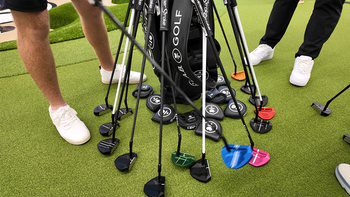
When the box of 14 CT10 sensors arrived, my initial thought was "there's no way these tiny things are going to survive my golf bag." Each sensor is about the size of a bottle cap and weighs next to nothing. The matte black finish looks professional, and they screw into the grip end of your clubs so subtly that playing partners don't even notice them unless you point them out.
Setting them up took me about 15 minutes total, and that included grabbing a beer halfway through. You just screw them into your grips (they fit standard grip holes), pull each club from your bag while wearing your compatible Garmin watch, and the watch automatically assigns each sensor to that club. No apps, no phones, no complicated pairing process. It just works. The skeptic in me was waiting for something to go wrong, but it didn't.

The Magic of Truly Automatic Shot Detection
This is where the CT10 system separated itself from every other shot tracker I've tested. With Arccos, I was constantly pulling out my phone. With Shot Scope, I had to remember to tag shots. The CT10? I literally forgot it was there for the first nine holes because it requires absolutely zero interaction from you during the round.
The sensors use a combination of GPS from your watch, accelerometer data from the sensor itself, and even sound detection to know when you've hit a shot. Practice swings? Ignored. That angry whack at a tree root after a bad shot? (Not that I've ever done that.) Also ignored. In my testing across 20+ rounds, it correctly identified actual shots about 95% of the time.
What really impressed me was how it handles those situations where you have multiple clubs out of the bag. Say you're between a 7 and an 8 iron, you pull both, take some practice swings with each, then hit the 7. The system almost always gets it right. On the rare occasion it doesn't, you can edit it post-round in about two seconds. But the key point: even when it occasionally picks the wrong club, it still records that you took a shot from that location, which is what really matters for scoring and statistics.
The only place where it's not fully automatic is putting. You need the putter sensor to track putting strokes, and while it detects your putts, you still need to manually confirm your score at the end of each hole on your watch. Honestly, I prefer this; it takes two seconds and guarantees your scorecard is accurate, especially for those gimmes and tap-ins that might not register as full strokes.
Real-Time Feedback That Actually Helps During Your Round
Most shot trackers make you wait until after your round to see any useful data. The CT10 gives you information that's actually helpful while you're playing. After you've hit just four shots with a club (and uploaded a scorecard), your watch displays your typical distance for that club before each shot. Not your best distance, not what you hope for, your actual average.
This was eye-opening and slightly depressing. Turns out my "150-yard 8 iron" is actually a 143-yard club on average. But knowing this has dramatically improved my club selection and reduced those frustrating "how did I come up short?" moments.
Even better is the distance to your last shot feature. Hit one into the trees? Your watch shows you exactly how far away your ball is and in what direction. I've used this to help playing partners find balls, too; it's that accurate. One guy in my regular group bought the system just for this feature after I helped him find three balls in one round.

The Post-Round Analysis That Actually Improves Your Game
This is where the CT10 system really shines. After your round, the data syncs to the Garmin Golf app (which is free, by the way), and you get revelations that would make a tour caddie jealous. Unlike competitors like Arccos that require annual subscription fees, Garmin gives you full access to all your data and insights without any ongoing costs. I'm talking about your actual dispersion patterns, not what you think they are.
For example, I always thought I missed greens pretty evenly left and right. The data showed I miss 70% of my approaches short and right. That's not a feel thing or a guess; that's hundreds of approach shots tracked with GPS precision. My fairway misses? 65% go left. My chips from 20-30 yards? I get up and down 31% of the time (which explains a lot about my scores).
The strokes gained data is particularly brutal but useful. It shows exactly where you're losing strokes compared to other golfers at your handicap level. For me, it's approach shots from 100-150 yards – I'm giving up 2.3 strokes per round in that range alone. Guess what I'm working on at the range now?
You also get all the standard stats like greens in regulation, fairways hit, and putting average, but with way more detail than you'd get from just keeping them yourself. The system knows not just that you missed the fairway, but by how much and in which direction. It knows not just that you missed the green, but whether you were short, long, left, or right. The dashboard compares your performance metrics to those of similar golfers across multiple categories, giving you context for where you stand relative to your peers.
Battery Life and Durability: The Boring Stuff That Actually Matters
Four years. That's how long Garmin claims the CR2032 battery in each sensor will last. I've had mine for three months, so I can't verify that claim, but considering I haven't had to think about charging or replacing anything yet, I'm optimistic. The batteries are user-replaceable when they do eventually die, which costs about $2 per sensor.
The sensors are water-resistant (IPX7 rated), and I've played in everything from light drizzle to torrential downpours without any issues. They go to sleep automatically when your clubs are stored upside down in your bag, which is a clever touch that probably extends that battery life considerably.
Temperature-wise, they're rated from 14°F to 122°F. I've played in 95-degree heat and 40-degree cold, and they've worked flawlessly. The sensors wake up automatically based on light and orientation, pull a club from your bag on a sunny day, and it's instantly connected to your watch. No buttons, no switches, nothing to remember.
Garmin CT10 Shot Tracker
Garmin CT10 Shot Tracker gives instant insight into every club in your bag.
Is the Garmin CT10 Shot Tracker Worth It?
Absolutely, while the Garmin CT10 Shot Tracker is a great product, there are a few pros and cons that you need to be aware of:
Pros:
Truly automatic shot tracking with 95% accuracy – no phones or manual tagging required
Provides genuinely useful data both during and after your round
Incredible battery life with smart power management
Cons:
Requires a compatible Garmin watch (adds $300-600 to the total cost if you don't have one)
Putter tracking still requires manual score confirmation.
An initial investment of $250 for the 14-sensor set might sting

Frequently Asked Questions
Can the CT10 Sensors Be Transferred Between Different Golf Clubs?
Yes, you can transfer CT10 sensors between different golf clubs. You'll need to unscrew the sensor from one club's grip end and thread it into another club's grip hole, ensuring it's tightly secured with no gap. After physically moving the sensor, you'll reassign it through your device's settings menu by selecting Club Sensors > Paired Sensors, choosing the Reassign option, and bringing the new club within 3 feet of your device.
How Long Does the Battery Last in Each Sensor?
You'll get up to 4 years of battery life according to Garmin's specs, but real-world usage tells a different story. Many users report their CR2032 batteries dying within 2-6 months, requiring frequent replacements. Your battery life depends on how often you remove clubs from your bag, storage conditions, and temperature extremes. The sensors enter sleep mode in darkness to conserve power, but frequent play markedly reduces the advertised lifespan.
Are the Sensors Waterproof for Playing in Rain?
Yes, your sensors are waterproof for playing in rain. They're rated IPX7, which means they'll handle rain, snow, and splashes without any problems. You can play through wet weather conditions confidently - the sensors will continue tracking your shots automatically even when it's pouring. They're specifically designed to withstand water exposure up to 1 meter for 30 minutes, so typical rainy golf conditions won't affect their performance at all.
Will CT10 Work With Non-Garmin Golf Watches or Devices?
No, CT10 sensors won't work with non-Garmin golf watches or devices. They use ANT+ protocol exclusively, which isn't compatible with other brands' products or smartphones. You'll need a compatible Garmin golf device to pair and use these sensors. There's no way to relay data through a Garmin watch to third-party apps either. If you're using non-Garmin equipment, you'll need to look for alternative shot tracking solutions that support Bluetooth connectivity instead.
Do the Sensors Affect Club Balance or Swing Weight?
You won't notice any meaningful impact on club balance or swing weight during play. While the sensors add minimal weight to the grip end and appear slightly bulky, they don't alter your swing mechanics or feel. Users report seamless experiences across practice swings, real shots, and putting without any balance interference. Once you're focused on your shot, the sensors become imperceptible, letting you maintain your natural swing throughout your round.
Final Verdict: The Best Shot Tracking System I've Tested
After testing virtually every shot tracking system on the market, the Garmin CT10 is the one that stays in my bag. It's not perfect; the requirement for a compatible Garmin watch is a substantial barrier for some, and the price isn't trivial. But if you already own a compatible Garmin device or are considering one, this is a no-brainer addition.
This system is perfect for the serious golfer who wants to understand their game better without the hassle of manual tracking. It's for the player who's tired of guessing their distances and wants real data to guide their practice sessions. It's not for the casual golfer who plays five times a year or someone who's happy with their current game and just wants to enjoy their rounds.
The CT10 has fundamentally changed how I approach both practice and play. I know exactly what I need to work on. I make better club selections, and I have data to back up equipment changes. If you're serious about improvement and own (or are willing to buy) a compatible Garmin watch, this is the best golf technology investment you can make right now.

Paul Liberatore
As the Founder of Golfers Authority Paul Liberatore Esq. has spent the last 7+ years writing about the best golf equipment or instruction from the top golf instructors in the world. He has been a contributing writer for Sports Illustrated Golf and GolfWRX. After graduating with honors from Purdue University, he realized that he had a passion for the golf business and the law. When he's not practicing law, or creating golf content on YouTube, he can be found on his syndicated Behind the Golf Brand podcast talking with the most prolific leaders in the golf industry.