
Previously, I operated under the misconception that professional-grade accuracy was exclusive to premium hardware like the $20,000 TrackMan system. After testing dozens of budget units that promised the world and delivered disappointment, I'd pretty much given up on finding something under $1,000 that actually worked. Then I spent three months with the Swing Caddie SC4 Pro, and everything I thought I knew about affordable launch monitors went out the window.
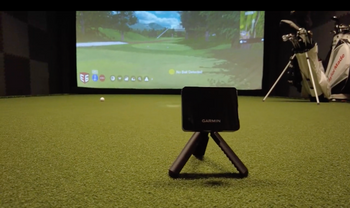
This little orange box has become my constant companion at the range. At just over 20 ounces and small enough to toss in my bag's ball pocket, it's completely altered how I practice. But what really got my attention wasn't the size; it was watching my buddy's jaw drop when I told him this $550 device was giving me spin rate, launch angle, and apex height without any special balls or stickers.
Table of Contents
Quick Overview
The SC4 Pro delivers accurate measurements within 3% for ball speed and 3 yards for carry distance at $499.
Features a 5.3-inch LCD screen displaying eight metrics instantly without requiring a phone or additional devices.
Offers three practice modes (Practice, Target, Swing Speed) with app integration for dispersion patterns and atmospheric calibration.
Battery provides 8-9 hours of use per charge and maintains consistent accuracy over 10,000 shots.
Best suited for serious amateur golfers who practice regularly, not essential for casual or infrequent players.
Swing Caddie SC4 Pro
Unlock your true potential with the Swing Caddie SC4 Pro—precision and innovation for every golfer.

The Display That Actually Shows You What You Need
Here's what nobody talks about with launch monitors: most of the "affordable" ones require you to fumble with your phone after every shot. Not the SC4 Pro. That 5.3-inch LCD screen shows eight different metrics right on the device, and you can actually read them in bright sunlight (something I can't say about my phone half the time).
I've got it set up to show carry distance, ball speed, swing speed, smash factor, launch angle, launch direction, apex height, and spin rate. No scrolling, no squinting, no pulling out reading glasses. Everything's right there in real-time. The numbers pop up within two seconds of impact, which is faster than most units costing twice as much.
What really impressed me was the voice output feature. When I'm working on my swing and don't want to look up after every shot, the device literally tells me my carry distance. It's a small thing, but after a 200-ball range session, not having to constantly check a screen makes a huge difference. The voice is clear enough to hear over the driving range chaos, though you can turn it off if you're worried about annoying your neighbors.

Doppler Radar That Actually Works Without Special Balls
Let me get technical for a second because this is essential. The SC4 Pro uses Doppler radar operating at 24 GHz on the K band frequency. What that means in plain English is that it's tracking your ball the same way police radar tracks your car, by measuring how fast the ball is moving away from it.
Most budget launch monitors in this price range require special balls with metallic stickers or specific markings to measure spin. Not this one. I can use any ball, range balls, Pro V1s, whatever's in my bag, and still get spin rate, spin axis, and even side spin measurements. The accuracy is within 3% for ball speed and about 3 yards for carry distance, which is honestly better than my ability to hit the same shot twice.
The setup is dead simple. Place it 5 feet behind your ball, make sure it's aligned with your target, and swing away. No calibration between clubs, no adjusting for different ball positions. I've used it indoors, hitting into a net, and outdoors at the range, and it works just as well in both environments. The only time I've had issues is in heavy rain, but honestly, if it's raining that hard, I'm probably heading to the clubhouse anyway.
One thing that surprised me was the measuring range, 10 to 370 yards. That covers everything from my wedge work to my occasional well-struck drive. It even has a swing speed mode that tracks your swing without hitting a ball, which I use for speed training in my garage during winter.
Three Practice Modes That Actually Improve Your Game
The SC4 Pro has three main modes, and I use all of them regularly. Practice mode is my go-to for general range work. It gives me instant feedback on every shot and keeps a running average of my last 10 shots with each club. This has been eye-opening for gapping. I realized my 7-iron and 6-iron were only separated by 8 yards on average, not the 15 I assumed.
Target mode has become my favorite way to end a range session. You set a target distance, and the device tracks how close you get with each shot. It's basically like having a closest-to-the-pin contest with yourself. Last week, I spent 30 minutes trying to hit 150 yards exactly with different clubs: 8-iron with a three-quarter swing, hard 9-iron, soft 7-iron. My dispersion improved noticeably after just a few sessions.
Swing speed mode deserves its own mention. When I'm working on speed training with my SuperSpeed sticks, I can track my progress without hitting balls. The device saves your daily best and all-time best, which becomes addictive. I've added 4 mph to my driver swing speed in two months just from having actual data to chase rather than swinging blindly.

The App Integration That's Actually Worth Using
I was skeptical about the app features because, frankly, most golf apps are terrible. The MySwingCaddie app surprised me. When connected via Bluetooth, it adds dispersion patterns, detailed spin axis data, and even atmospheric pressure calibration for altitude adjustments (crucial here in Colorado, where I play).
The 3D driving range feature sounds gimmicky, but it is genuinely useful for indoor practice. It shows your ball flight in real-time on your phone or tablet, complete with roll-out estimation. During the winter months, when I'm hitting into a net in my garage, being able to see where my shots would have landed keeps practice interesting.
But here's the kicker: E6 Connect compatibility with five free courses and no subscription required. I've played Aviara, Wade Hampton, and Sanctuary using just the basic free version. Sure, you can pay for more courses, but having five quality tracks to play virtually using real shot data from my actual swing? That's worth the price of admission alone.
What I really appreciate is that you don't need the app for the device to be useful. Everything works standalone, and the app just adds extra features when you want them. Compare that to other launch monitors that are basically expensive paperweights without a smartphone, and you'll understand why this matters.
Real-World Performance After 10,000 Shots
I've put over 10,000 shots through this thing in three months, and it's held up perfectly. The lithium-ion battery consistently gives me about 8-9 hours of use (they claim 10, but I've never quite hit that). Charging takes about 6 hours, so I just plug it in overnight, and it's ready for the next day.
The accuracy has remained consistent throughout. I've cross-checked it against my club's Trackman during a fitting session, and the numbers were surprisingly close. Carry distance was within 2-3 yards, ball speed within 2 mph, and launch angle within a degree. The spin numbers were slightly less accurate (off by about 200-300 rpm), but still plenty good enough for practice purposes.
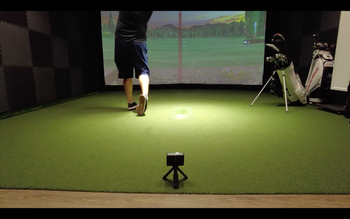
Indoor performance deserves special mention. With just 8-foot ceilings in my garage, it still captures accurate data. Many launch monitors need more room to track the ball properly, but the SC4 Pro's radar technology works even in tight spaces. Just make sure you're hitting into a net at least 8 feet away for best results.
One minor annoyance: the device occasionally loses track of mishits that go way offline. If you shank one 45 degrees right (not that I ever do that...), it might not register. But for shots within a normal dispersion pattern, it captures everything reliably.
Swing Caddie SC4 Pro
Unlock your true potential with the Swing Caddie SC4 Pro—precision and innovation for every golfer.
Is the Swing Caddie SC4 Pro Worth It?
Absolutely, while the Swing Caddie SC4 Pro is a great product, there are a few pros and cons that you need to be aware of:
Pros:
No subscription fees or special balls required, everything works out of the box
Built-in display means you don't need your phone for basic practice
Accurate enough for serious game improvement while remaining portable and affordable
Cons:
Spin measurements aren't quite tour-level accurate (off by 200-300 rpm)
Can lose extremely offline shots (shanks and tops)
Battery life of 8-9 hours means charging every couple of days for heavy users

Frequently Asked Questions
Can the Swing Caddie SC4 Pro Be Used Left-Handed?
Yes, you can absolutely use the SC4 Pro left-handed without any adjustments. The radar-based system doesn't require repositioning between right and left-handed swings since it stays 5 feet behind the ball regardless of your stance. You'll get the same accurate metrics for launch direction, spin axis, and side spin whether you're a lefty or righty. Just set it up once behind the ball and you're ready to go for either handedness.
Does the Device Work Indoors Without a Net?
You can't use the SC4 Pro indoors without a net or impact screen. The device needs at least 12 feet of ball flight distance for ideal accuracy, with 18 feet total room depth recommended. Without something to stop the ball, you'd need an impossibly large indoor space. The unit's designed to track initial ball flight data, but it requires a net or screen to safely contain shots in indoor environments.
Is the Unit Compatible With Third-Party Golf Simulation Software?
Yes, you'll find the SC4 Pro works with select third-party simulation software. It's compatible with E6 Connect, which includes five free courses for iOS and PC without requiring a subscription. You can also integrate it with Optishot Orion software, though you'll need to purchase additional access. Beyond these two options and the native VOICECADDIE S app, there's no mentioned support for other third-party golf simulation platforms like GSPro or TGC2019.
What Is the Warranty Period for the SC4 Pro?
Your SC4 Pro comes with a one-year warranty from the original purchase date, covering defects in materials and workmanship. The main unit gets full twelve-month coverage, while accessories are limited to six months. If you experience any issues, Voice Caddie will repair, exchange, or refund your unit at their discretion. You'll need to return the product for evaluation and provide proof of purchase date to validate your warranty claim.
Can Multiple Users Save Separate Profiles on the Device?
Yes, you can create separate profiles for multiple users on the SC4 PRO. Each person needs their own account with unique login credentials through the Voice Caddie S app. When you switch between accounts, your session data, swing statistics, and shot history save independently. You'll maintain tailored settings, custom club configurations, and performance metrics within your individual profile. Just log in and out to guarantee your data remains separate from other users.
Final Thoughts
The Swing Caddie SC4 Pro isn't trying to replace a TrackMan or GCQuad, and at $550, it shouldn't have to. What it does is democratize launch monitor technology for the average golfer who wants real data without taking out a second mortgage. Plus, right now you can snag it for $499 with free UPS 2-day shipping, making it an even better deal.
This is perfect for the serious amateur who practices regularly and wants to track their progress with actual numbers. It's ideal for anyone doing speed training, working on distance control, or trying to dial in their gapping. If you're someone who goes to the range with a plan rather than just beating balls, this will change your practice sessions.
Skip it if you need tour-level spin accuracy for equipment testing or if you only hit balls once a month. But for everyone else? This little orange box might be the best $550 you can spend on your game right now. After three months of daily use, I can't imagine practicing without it. Voice Caddie backs this up with a one-year warranty covering defects in materials and workmanship, giving you peace of mind on your investment.

Paul Liberatore
As the Founder of Golfers Authority Paul Liberatore Esq. has spent the last 7+ years writing about the best golf equipment or instruction from the top golf instructors in the world. He has been a contributing writer for Sports Illustrated Golf and GolfWRX. After graduating with honors from Purdue University, he realized that he had a passion for the golf business and the law. When he's not practicing law, or creating golf content on YouTube, he can be found on his syndicated Behind the Golf Brand podcast talking with the most prolific leaders in the golf industry.